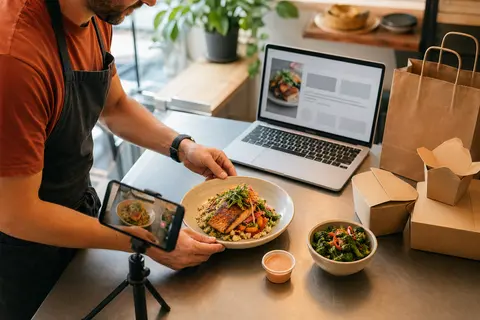
Menu photos should help customers decide, not decorate the page
Restaurant owners often treat menu photos as an all-or-nothing project.
Either every item needs a polished image before online ordering can launch, or the menu goes live with no photos at all because the team does not have time for a full shoot. Both choices can slow the restaurant down.
Photos are useful, but they do not need to be perfect or complete on day one. The better question is: which photos will remove the most hesitation for a customer trying to place an order on their phone?
OmNom gives restaurants direct online ordering with zero commission and zero monthly platform fees. Standard Stripe processing still applies. OmNom can also help restaurants set up their menus, which matters because the launch path should not get stuck behind a giant media project. A clear menu with a few strong photos is usually more useful than a delayed menu waiting for every item to look finished.
Photograph the dishes customers most need to understand
Start with the items where a photo answers a real customer question.
Some menu items are obvious from the name. A fountain drink, side of fries, plain bagel, or chocolate chip cookie may not need the first photo slot. Other items carry more uncertainty:
- signature entrees
- combination plates
- bowls and salads with several ingredients
- family meals
- large-format catering items
- unfamiliar regional dishes
- premium items with higher prices
- items where portion size is hard to imagine
Those are the photos that help customers decide faster. A good image can show scale, ingredients, freshness, and the difference between two similar items.
For example, if a restaurant sells three chicken sandwiches, every sandwich may not need a photo immediately. But the house special with slaw, sauce, and a higher price probably does. If a customer can see why it is different, the item has a better chance of feeling worth the choice.
The goal is not to make the menu pretty. The goal is to make the next tap easier.
Prioritize bestsellers, high-margin items, and confusing choices
A useful first photo list usually comes from three places: what sells, what you want to sell, and what customers misunderstand.
Start with bestsellers because they are already carrying demand. If regulars love an item in the dining room, a clear online photo helps the digital menu match the in-person experience. It also makes the ordering page feel more alive to new customers who do not know the restaurant yet.
Then look at items that are important to the business. That might mean higher-margin dishes, catering trays, party packs, or meals that represent the restaurant well. These photos are not just decoration; they help customers understand the value of the items you most want them to notice.
Finally, check the items that create questions. If customers call to ask what comes with a combo, whether a bowl is large enough for dinner, or what a specialty item looks like, that item deserves a photo before another obvious side dish does.
A simple first pass might include:
- the top five sellers
- the top three signature or premium items
- the top three items customers ask about
- one photo for each major menu section
That gives the online menu visual confidence without turning launch into a full catalog shoot.
Keep photos honest to the takeout experience
The best online ordering photos set the right expectation.
That does not mean every photo has to show food inside a closed takeout container. A plated photo can still work well, especially when it shows the ingredients clearly. But the photo should not make a pickup or delivery order feel wildly different from what the customer receives.
Avoid images that create confusion:
- oversized portions that do not match the actual item
- garnishes the kitchen does not use during normal service
- props that make the item look like a different offer
- old photos from a previous recipe
- photos of dine-in-only presentation for a takeout-only menu item
Online ordering works best when the customer trusts the page. If the food arrives and feels aligned with the photo, the restaurant builds confidence for the next direct order. If the image feels exaggerated, the restaurant may win one click and lose trust after pickup.
This is especially important for modifiers and add-ons. If a burger photo shows bacon, avocado, or extra sauce, make sure the item description and modifier options make that clear. The photo and the ordering rules should tell the same story.
For modifier cleanup, read Restaurant Menu Modifiers: How to Keep Online Orders Accurate Without Slowing Checkout.
Use consistency before perfection
Most restaurant teams do not need an expensive shoot before launching direct ordering.
They need a consistent style that makes the menu easy to scan. A phone camera can work if the basics are controlled:
- use natural light when possible
- photograph on the same counter or table
- keep the angle similar across items
- remove clutter from the frame
- crop so the food is easy to see on mobile
- avoid heavy filters that change the food color
- keep hands, packaging, and props out unless they clarify scale
Consistency helps customers compare items. If every photo has a different angle, background, crop, and lighting, the menu can feel messy even when each individual photo is fine.
A practical approach is to photograph one section at a time. Start with entrees. Then add bowls, sandwiches, sides, desserts, or catering later. The menu can improve over time without making customers wait for a complete visual library.
That same incremental logic applies to the rest of launch. If the restaurant is still preparing the full online ordering setup, use Restaurant Online Ordering Menu Checklist: What to Fix Before Launch to catch the basics before promoting the page.
Do not hide a good menu behind a missing photo
Photos help, but missing photos should not automatically block a good direct ordering menu.
Some items can launch with a clear name, a useful description, accurate pricing, and clean modifier choices. If the kitchen is ready, the hours are correct, and the checkout path works, the restaurant should not delay every order because a side salad does not have an image yet.
The better standard is simple:
- important items should get photos early
- confusing items should get photos early
- obvious items can wait
- old or misleading photos should be removed
- the menu should keep improving after launch
This keeps the project moving. It also prevents a common trap: spending too much time polishing the menu presentation while the restaurant still has no live direct ordering path.
If your current restaurant website still needs a clear order button, read How to Add Online Ordering to Your Restaurant Website Without a Full Redesign.
Where OmNom fits
OmNom is built for restaurants that want direct online ordering without paying OmNom commission or monthly platform fees. Standard Stripe processing still applies.
That matters for menu photos because the restaurant is investing in its own ordering channel, not just decorating a third-party listing. Every clear photo, accurate description, and clean modifier group makes the restaurant's direct path easier to trust.
You do not need to photograph everything before getting started. Pick the items that reduce hesitation, keep the images honest, and improve the menu in practical rounds.
If you want help turning your restaurant menu into a direct ordering page, start with OmNom, or keep reading operator guides on the OmNom blog.