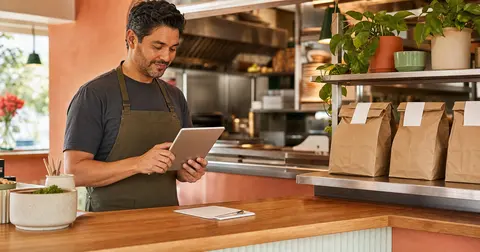
The order is not done when checkout is done
A pickup order can look successful on screen and still create friction inside the restaurant.
The guest paid. The ticket landed. The kitchen started cooking. But if the counter does not know where the bag should go, how the customer will identify it, or who handles questions when the guest arrives, the direct ordering system starts to feel messier than a phone call.
OmNom gives restaurants direct online ordering with zero commission and zero monthly platform fees. Standard Stripe processing still applies. That helps the restaurant keep the economics cleaner, but the operational win only shows up when the pickup handoff is clear enough for a real shift.
The goal is simple: when an online order arrives, everyone should know what happens next.
Decide where online pickup orders live
Pickup handoff starts with a physical place.
That place can be a shelf, counter section, host stand, warmer, or labeled station near the register. It does not need to be fancy. It does need to be consistent.
If bags move to a different spot every hour, staff have to ask each other the same questions:
- is this order still being made
- is it waiting for the customer
- did someone already hand it out
- does it need a drink, sauce, or cold item
- is the customer early or is the order late
A stable pickup area turns those questions into a visible workflow. The kitchen finishes the food, the counter confirms the bag, and the guest has a predictable place to check in.
This is especially important when restaurants start pushing more guests to direct ordering. A small number of online tickets can be handled casually. A steady lunch rush needs a system.
Use names and order details staff can actually read
The best pickup handoff is boring in the right ways.
Staff should be able to identify the order quickly without decoding a screen, searching through bags, or asking the kitchen to repeat the ticket. That usually means every order needs a clear customer name, pickup time, and enough item detail to catch obvious mistakes before handoff.
For many restaurants, the practical check is:
- customer name is visible
- pickup time is visible
- order status is easy to update
- modifiers are readable
- drinks, sides, and sauces are not hidden at the bottom
- paid status is clear enough that staff do not ask the guest twice
This does not mean every bag needs a long label. It means staff need the right information at the moment they hand food to a customer.
If modifiers are the part that keeps slowing the line down, fix those separately. The handoff will not stay clean if the ticket itself is confusing. Start with Restaurant Menu Modifiers: How to Keep Online Orders Accurate Without Slowing Checkout.
Separate "ready" from "almost ready"
One common pickup problem is the almost-ready order.
The entree is boxed. The side is still coming. The drink has not been poured. The cold dessert is in the cooler. The customer walks in, sees a bag, and assumes the order is complete.
That is how small misses turn into awkward counter moments.
Restaurants should separate orders that are still being assembled from orders that are truly ready for pickup. The exact method depends on the restaurant, but the rule should be clear:
- "in progress" means staff are still building the order
- "ready" means the customer can receive the full order
- "picked up" means the order has left the restaurant
That distinction helps the kitchen, the counter, and the customer. It also makes online order tracking more believable because the status matches the real bag, not just the first item that left the line.
For timing expectations before the order reaches handoff, read Restaurant Online Ordering Prep Times: How to Set Customer Expectations Without Slowing the Kitchen.
Give customers one clear pickup instruction
Customers do not need a long policy. They need to know what to do when they arrive.
Good pickup instructions are short and specific:
- "Check in at the counter with your name."
- "Use the pickup shelf near the register."
- "Park in the marked pickup spot and come inside."
- "Call when you arrive if curbside is enabled."
The important part is that the instruction matches what staff are prepared to do.
Do not offer curbside if no one watches the phone. Do not tell guests to skip the line if the counter has no pickup area. Do not promise a self-serve shelf if staff still need to verify drinks or age-restricted items.
Direct ordering works best when the customer promise is small enough to keep every time.
Keep delivery out of the pickup handoff
Pickup and delivery should not share every operational assumption.
Pickup handoff is built around a guest arriving at the restaurant. Delivery handoff has more moving parts: driver assignment, driver arrival, restaurant readiness, travel time, and customer drop-off. Treating delivery like "pickup with a driver" can create the wrong expectations for both staff and customers.
For direct ordering, that separation matters. A pickup order can become restaurant-visible as soon as the restaurant accepts the normal order flow. Delivery should be promised only when the restaurant can actually support the radius, timing, and driver capacity behind it.
If you are still deciding whether delivery belongs in the first launch, read Pickup Only or Delivery? How Restaurants Should Decide What to Turn On First.
Run the handoff test before you announce the link
Before putting a direct order link everywhere, test the handoff with a real order.
Place an order from a phone and watch what happens inside the restaurant:
- where does the ticket appear
- who notices it first
- how does the kitchen mark progress
- where does the bag go
- how does the counter know it is complete
- what does the customer see or receive
- what would happen if three orders arrived at once
That last question is the real test. A single order can survive an improvised process. Three orders during a rush will reveal whether the system is ready.
This is also where OmNom's setup speed is useful. Restaurants can get a direct ordering path live quickly, often without a long technical project, but the operator still benefits from a short real-world rehearsal before sending regulars into the channel.
If the broader launch path is still coming together, use How Restaurants Can Launch Online Ordering in 15 Minutes and Restaurant Online Ordering Menu Checklist: What to Fix Before Launch as companion checks.
Where OmNom fits
OmNom is built for restaurants that want direct online ordering without adding an OmNom commission or monthly platform fee. Standard Stripe processing still applies, and restaurants can receive direct payout visibility through Stripe instead of treating every order as marketplace traffic.
That makes the pickup handoff worth getting right. When the restaurant owns more of the ordering path, it also owns the chance to make the experience simpler for staff and repeat guests.
Start with one reliable pickup area, readable order details, honest ready states, and a customer instruction your team can keep. Then send more guests to the direct link with confidence.
If you want a direct ordering setup that keeps the software side simple while you tune the restaurant workflow, start with OmNom or browse more practical guides on the OmNom blog.